Michelle Geneser

Michelle Geneser

Product Design Leader

15+ years designing complex software products, from enterprise platforms serving millions to AI-powered ventures taken from idea to funding. Based in Des Moines, IA.

Portfolio
Incorrect password. Please try again.

Product design leader who builds from zero.

15+ years designing complex software products. From enterprise platforms serving millions to AI-powered ventures taken from idea to funding. I partner with cross-functional teams to ship software that solves real problems — leading with customer discovery, first-principles thinking, and design craft.

Discovery & Validation

Customer interviews, sacrificial concepts, journey mapping, assumption mapping, and concept testing — understanding problems deeply before jumping to solutions. I use co-design sessions and ideation workshops to align teams and surface hidden requirements early.

AI-Accelerated Design

AI is embedded across my workflow — from exploration and concept generation to rapid prototyping, design critique, synthesis, and spec writing. It lets me move faster from ambiguity to tangible interfaces without sacrificing craft.

From Zero to Shipped

Three consecutive 0→1 ventures, each taken from first customer conversation to paying product. I write specs, build prototypes, and work side-by-side with engineering to ship — operating autonomously while keeping stakeholders aligned.

← Back to all work

Replacing Spreadsheets with Intelligent Compliance Workflows

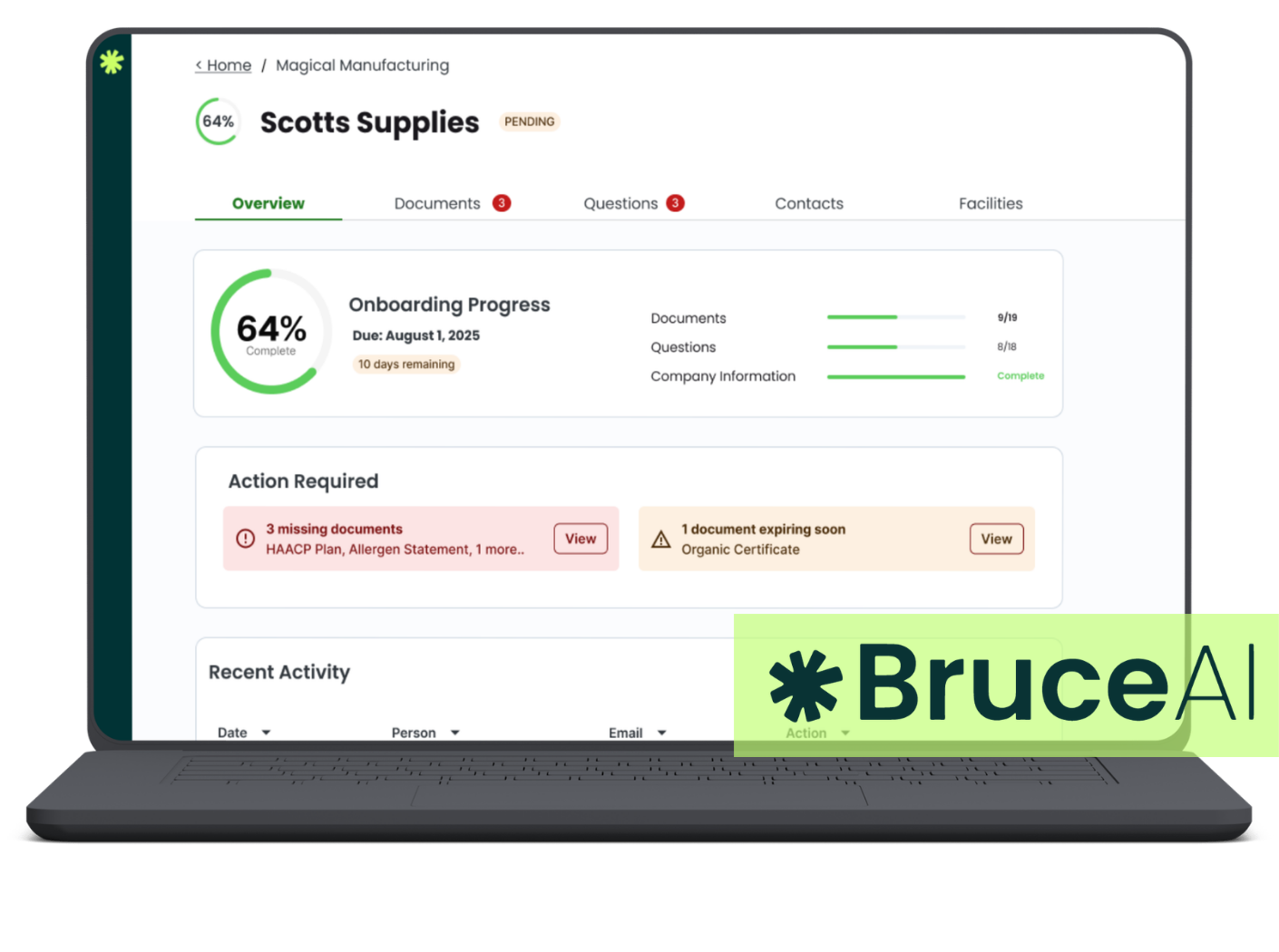
Co-founded Bruce AI and led product design from zero. Our team turned a chaotic, spreadsheet-driven food compliance process into an AI-powered platform that proactively manages documentation across entire supplier networks.
Role
Co-Founder, Head of Product Design
Timeline
Jan 2025 - Present
Team
Venture Team - Technology, Business and Product
Bruce AI supplier detail view showing compliance status and onboarding progress

The Problem

Food manufacturers and co-packers manage compliance documentation (certifications, lab results, allergen declarations) across 20 to 100+ suppliers, each with dozens of documents. Before Bruce AI, this all lived in Google Drive folders, spreadsheets, and email chains. There was no tracking for expirations.

The problems usually surfaced at the worst possible moment. A customer requests a document for a shipment, and that's when the QA team discovers it's expired. They scramble to request it again, causing delays and potential profit loss. During a recall, missing or expired documents can create serious liability.

This wasn't just a "digitize the spreadsheet" problem. The real challenge was designing a system that shifts QA teams from reactive (discovering expired docs during a crisis) to proactive (the system tells you what needs attention before it becomes a problem).

Discovery & Framing

Before designing any screens, the team spent weeks in customer discovery — interviewing QA managers, observing their workflows, and mapping their jobs-to-be-done. We used assumption mapping to prioritize the riskiest unknowns and co-design sessions with QA managers to test early product directions before committing to build.

Sacrificial concepts played a key role early on — throwaway designs that provoked honest feedback about what mattered and what didn't. Those conversations revealed the core insight: QA teams didn't need a better spreadsheet. They needed a system that anticipated problems and told them what to do about it. That framing shaped every design decision that followed.

The Hardest Design Problem

Showing compliance status across 100 suppliers with dozens of documents each — exponential complexity across every dimension. Each document can be valid, expiring soon, expired, missing, or under review. Each supplier's overall compliance depends on all of their docs. On top of that, the AI categorization confidence, the alert system, and supplier onboarding all compound on each other.

The challenge was making all of this scannable at a glance while still providing the depth QA managers need to actually take action.

Compliance dashboard design

Show the rolled-up supplier status view with actionable compliance indicators

The Approach

We structured the information architecture around three main layers, each documented in detailed design specs that aligned the team before engineering work began:

Dashboard layer: Rolled-up, actionable compliance status. Not vanity metrics, but things you need to act on today.

Document views: Deep-dive into the specifics of individual documents: status, expiration, AI categorization, linked supplier.

Supplier onboarding: A flow for bringing new suppliers into the system and collecting their documentation without creating a massive upfront burden.

Document detail view

Show AI categorization + manual override
Supplier onboarding flow

Show how new suppliers are brought in

Building Trust in AI

All documents are automatically scanned and categorized using AI. But QA managers need to trust that categorization before they'll stop manually reviewing everything. We designed the system to surface confidence levels, allow manual overrides, and show its work — so managers could verify early and trust the system over time.

Alert / expiration notification design

Show how proactive alerts surface without creating notification fatigue

Design System Thinking

With the variety of document types, compliance states, and supplier configurations, we established reusable patterns early: status indicators, document cards, compliance badges, and alert hierarchies. These patterns needed to scale as customers brought on more suppliers without the interface becoming overwhelming. Documenting these as a component library gave engineering a shared language and reduced design-to-dev handoff friction.

Component library / design system snapshot

Show reusable patterns: status indicators, document cards, compliance badges

Outcome

2 mo
Concept to working product
5
Enterprise customers onboarded
100s
Suppliers added via customer networks
6+
Hours saved per week per QA team

Shifted teams from reactive crisis management to proactive compliance. The system tells them what needs attention before a shipment or an audit, not after.

← Back to all work

From Idea to Seed Funding: An AI Sales Platform for Insurance

Led product design for Otto at 1848 Ventures, where our team built an AI-powered sales platform that transforms how independent insurance producers find, evaluate, and win commercial accounts.

Role
Co-Founder, Head of Product Design
Timeline
2024 - Present
Team
Venture Team - Technology, Business and Product
Otto product overview screenshot

Recommended: The prospect discovery or risk analysis view

The Problem

Independent insurance producers spend a lot of time prospecting manually. They buy lists, search for similar businesses, and piece together information from scattered sources. There wasn't a tool that pulled all of this together for independent agents.

Insurance prospecting isn't just "find leads." It's a multi-step intelligence workflow: discover a prospect, understand their risks, prepare for a conversation, then match to the right carriers. Each step requires different data, displayed differently, for different decisions.

The biggest design challenge: normalizing data from 50+ AI agents pulling from disparate sources into a single coherent interface. Each agent surfaces different types of data in different formats. The product needed to make all of that feel unified, scannable, and actionable for producers who aren't especially technical.

From Ambiguity to Structure

Insurance was a completely new domain for the team. We started with competitive analysis of existing prospecting tools and extensive customer discovery — shadowing independent producers, sitting in on sales calls, and storyboarding their end-to-end workflow. This research surfaced the jobs-to-be-done that shaped the entire product architecture.

We ran ideation sessions with the venture team to rapidly explore product directions, then used concept testing with producers to validate which approaches resonated. Each major feature started with a design spec that defined the problem, proposed interaction patterns, and documented trade-offs — keeping everyone focused on the same user problems as the product evolved quickly.

The Core Workflow

Prospect discovery: Producers can search for specific prospects or receive AI-recommended leads based on their preferences and carrier appetites.

Prospect discovery / search interface

Show how recommendations surface alongside manual search

Risk analysis: Once a producer identifies a prospect, they see a comprehensive risk profile with all the information they need to decide if they want to pursue the lead.

Risk analysis profile view

Show the normalized data display across dozens of data points

Conversation prep: Otto helps producers prepare for discussions. It knows exactly what risks they need to ask about, so they walk into meetings feeling confident.

Conversation prep / briefing view

Show how AI-generated talking points are structured

Carrier matching: Based on the risk profile, Otto matches prospects to the right carriers so producers write business that underwriters love to approve.

Information Density & Navigation

With 50+ AI agents pulling data from different sources, the team needed strong patterns for displaying varied data types consistently. We built a component framework that could handle everything from financial data to location info to industry-specific risk factors — all in a way that felt unified and scannable. The information architecture had to balance density for power users against approachability for producers who aren't especially technical.

Data display component patterns

Show how different data types are normalized into consistent UI patterns

Outcome

<1 yr
Idea to seed funding
2 mo
To paying customers after launch
50+
AI data sources normalized
Advisory
Board built with industry experts
← Back to all work

Making AI Forecasts Trustworthy for Restaurant Teams

Led product design during the 0 to 1 phase of Lineup.ai, partnering with engineering and data science to translate complex AI forecasting models into intuitive daily tools used by hundreds of restaurant employees.

Role
Senior Product Designer
Timeline
Mar 2022 - May 2024
Team
Partnered closely with engineering and data science teams.
Lineup.ai product overview

Recommended: Forecast view or scheduling interface

The Problem

Restaurant managers make scheduling, forecasting, and labor decisions that directly impact profitability. Most of them rely on gut instinct and spreadsheets. AI can predict demand, optimize schedules, and reduce labor costs, but only if managers trust it enough to actually use it.

The product needed to work for two very different audiences: corporate operations teams (data-heavy, analytical) and individual restaurant managers (time-crunched, action-oriented, on the floor all day).

The hardest part wasn't the AI. It was the trust gap. Restaurant managers have decades of intuition about their business. An AI forecast that says "you need 2 fewer servers Friday night" feels risky when you're the one who'll hear about it if service suffers. The design had to let them feel in control while nudging them toward better decisions.

Designing for Two Audiences

The team used heuristic evaluation and direct customer feedback to build a prioritized usability backlog — not waiting for formal research cycles, but using experience and pattern recognition to identify friction points quickly. We ran regular feedback sessions with both corporate ops teams and on-the-ground managers to validate assumptions and catch misalignments early.

This dual-audience challenge shaped every interaction pattern: corporate users needed data density and configurability, while restaurant managers needed glanceable, action-oriented views they could use between rushes.

Deep Dive: Auto-Scheduling — From Painpoint to Shipped Workflow

Auto-scheduling became the product's signature feature — and it started from a clear painpoint surfaced during customer discovery. Restaurant managers were spending hours each week building schedules manually, juggling availability, labor laws, skill mix, cost targets, and training requirements. We mapped their end-to-end scheduling journey from pre-shift prep through close to understand where AI could reduce cognitive load without undermining their expertise.

The team used sacrificial concepts to test fundamentally different scheduling approaches with managers — from fully automated to heavily manual — before committing to an interaction pattern. Concept testing revealed that managers didn't want to be removed from the process; they wanted a smart starting point they could adjust. That insight shaped the entire design direction.

We iterated from early concepts through to a shipped workflow that launched across both the web dashboard (for corporate ops teams doing multi-location scheduling) and the mobile employee app (for managers making real-time adjustments on the floor). The interface had to make a tangled web of constraints feel manageable without hiding the complexity underneath.

Scheduling interface

Show how constraints are handled in the UI without overwhelming managers

Core Product Areas

Demand forecasting: AI predictions for sales, traffic, and labor needs. The forecast views were designed to show not just what the system recommended, but why — making the AI's reasoning transparent and editable.

Forecast view design

Show how AI predictions are displayed with context and reasoning

The override system: Managers could override any AI suggestion, and the system learned from those overrides. It's not "the AI knows best." It's "let's figure this out together, and the system gets smarter over time."

Override flow

Show how managers adjust AI suggestions
Mobile daily view

Show the pared-down mobile experience

The Biggest Design Win

Giving managers the confidence they would be prepared for whatever the day gave them. The shift from "I don't trust this forecast" to "I feel ready for today" was the moment the design was working. That's a design achievement, not just a data science one — and it came from the whole team iterating on the right signals to surface.

Outcome

0→1
Built from the ground up
100s
Daily mobile app users
Multi
Restaurant groups scaled to
Foundation
Design system established for the team
← Back to all work

Designing a Platform 80% of an Industry Adopted

Led design and launch of the veterinary industry's first pet travel health documentation engine, working with a cross-functional product team to build a platform now used by 80% of the industry.

Role
UX Manager
Timeline
Nov 2019 - Mar 2022
Team
Product Team - Technology, Product and Product Design
GVL product overview

Recommended: The travel documentation interface or dashboard

The Problem

International pet travel requires complex health documentation that varies by country, species, and constantly changing regulations. Veterinarians were spending hours researching requirements for each trip, often navigating multiple government databases and hoping they had the latest information.

Multiple User Types, One Platform

The product served very different users with very different needs: veterinary offices creating and managing documentation, individual pet owners tracking their requirements, and regulatory bodies setting the rules. Each user type needed a different view into the same underlying data.

We conducted experience mapping across all three user types to understand their end-to-end workflows and emotional states, then mapped the jobs-to-be-done for each to define the navigation model and feature hierarchy — ensuring each audience could accomplish their core tasks without being overwhelmed by functionality designed for other roles.

Multi-user architecture

Show how different user types interact with the platform

Information Architecture

The hardest design challenge was structuring ever-changing regulatory information in a way that felt manageable. Requirements differ by destination country, departure country, species, and they update frequently. We used card sorting and tree testing with veterinary staff to validate the information architecture, then designed a system that surfaced the right requirements at the right time — guiding users through the process rather than dumping all the complexity on them at once.

Usability testing across veterinary offices helped the team iterate on the documentation workflow, catching friction points that weren't visible in the design phase and ensuring the product worked in real clinical environments.

Documentation workflow

Show the step-by-step travel health doc process
Dashboard / status tracking

Show how compliance status is rolled up

Design Standards & Scaling Quality

As the product grew, we established design standards, reusable component patterns, and documentation that enabled the broader product team — including engineers — to make strong design decisions independently. This included heuristic-based review processes and a shared component library that raised the quality bar across the organization and reduced reliance on design bottlenecks.

Outcome

80%
of the veterinary industry uses GVL
First
Pet travel health documentation engine
Multi
Products shipped from inception
Standards
Design system and guidelines established
Michelle Geneser

About me

I'm a product design leader based in Des Moines, IA with 15+ years designing complex software products across enterprise, startup, and venture studio environments.

I work best embedded in cross-functional teams — partnering with engineering, product, and data science to move from ambiguous problems to shipped products. My approach leans on customer discovery, Jobs to Be Done, and design specs as alignment tools, not just deliverables. I write specs, build prototypes, and work side-by-side with engineers to ship.

Most recently at 1848 Ventures, I co-founded two AI-powered ventures (Bruce AI and Otto) with small, fast-moving teams — taking both from concept to paying customers. I'm most energized by the 0 to 1 phase: taking an ambiguous problem, talking to customers, and building something that actually works for them.

When I'm not designing products, I'm involved in the Des Moines community. I've served on the board of the Greater Des Moines Leadership Institute and Girls Rock! Des Moines, among others.